CAT6 vs CAT6a: What You Actually Need for Your Home Network
/ 8 min read
Table of Contents
If you are wiring up your home and have started shopping for ethernet cable, you have probably noticed that CAT6 and CAT6a sit right next to each other on the shelf with similar price tags. It is easy to assume the “a” just means newer or better, so you should always grab it. The reality is a bit more nuanced, and for most home installs the choice is simpler than the spec sheets make it seem.
This post walks through what actually separates CAT5e, CAT6, and CAT6a, when each one makes sense, how to verify you are getting genuine CAT6a when you pay for it, and the tools you will need to terminate your own runs.
The Short Version
For a typical home network, CAT6 is more than capable. If you are running a mix of 1 Gbps and 2.5 Gbps devices across normal home distances, CAT6 handles it without breaking a sweat. You do not need to spend extra on CAT6a just because it exists.
Where CAT6a earns its keep is in specific situations: bundling a lot of cables together through a shared conduit, or routing runs close to electrical wiring. In both of those cases, the extra shielding in CAT6a actively helps. Outside of those scenarios, the upgrade is largely theoretical for home use.
What Actually Separates Them
CAT5e tops out at 100 MHz and 1 Gbps. It has no internal spline, so the four pairs sit loosely inside the jacket with minimal crosstalk rejection. Fine for existing installs, but not worth running in new ones.
CAT6 steps up to 250 MHz and adds a plastic cross-shaped spline that physically separates the pairs. It supports 1 Gbps at full distance and 10 Gbps up to around 55 meters, which covers most home runs without issue.
CAT6a (augmented) doubles the bandwidth to 500 MHz and holds 10 Gbps for the full 100-meter distance. The spline is significantly thicker, and better variants add per-pair insulation on top of that. The tradeoff is size: CAT6a runs around 8-9mm in diameter versus 5-6mm for CAT6, which adds up when pulling through tight spaces or packed conduit.
The Inside of the Cable: How to Spot Real CAT6a
Both CAT6 and CAT6a have a plastic cross-shaped separator inside the cable jacket, called a spline, that keeps the four twisted pairs physically separated from each other. This is one of the things that gives each spec its crosstalk performance.
The difference when you look at a cross-section is meaningful. In CAT6, the spline is relatively slim. In a properly built CAT6a cable, that separator is significantly larger and more substantial, and in some variants each pair is also wrapped in foil shielding on top of that.
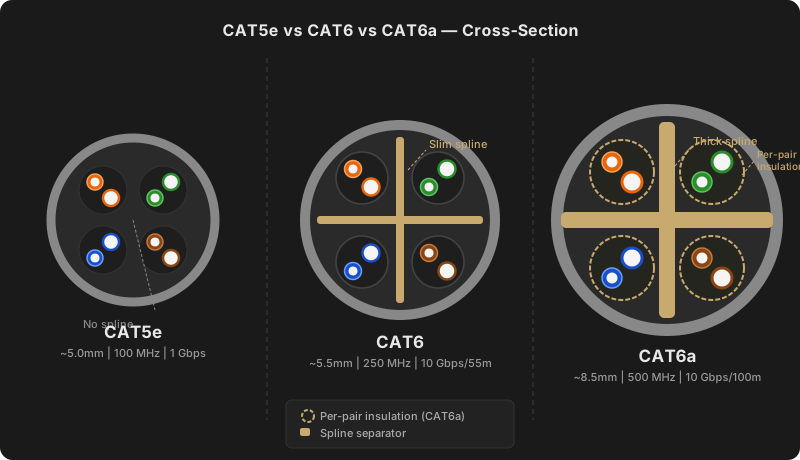
This matters because counterfeit and underspec’d CAT6a cable is a real problem. If you strip back the jacket of something labeled CAT6a and the internal separator looks as thin as a standard CAT6, you likely have a cable that does not live up to the rating on the box. Cheap no-name cable on Amazon is a common offender. Before you commit to a bulk spool, look up a review that physically cuts the cable open, or buy a short test length and check it yourself before pulling 1000 feet through your walls.
When you are buying in bulk, a few brands that hold up reasonably well: Belden, Southwire, and Monoprice are commonly recommended. If the price seems too good to be true on a 1000-foot spool, it usually is.
When CAT6 Is the Right Call
For most home wiring projects, CAT6 is the practical choice. Here is what that looks like in practice:
- Drops to bedrooms, offices, and living rooms for regular devices
- Point-to-point runs that will not share a conduit with a bunch of other ethernet cables
- Any run under 50 meters to a device that will not push past 2.5 Gbps in the near future
- Situations where the cable runs near, but not directly alongside, household power wiring
The cost difference between CAT6 and CAT6a can be meaningful across a full-house pull, and the performance difference in a standard home environment rarely shows up in real-world use.
When CAT6a Is Worth the Upgrade
There are a handful of situations where spending a bit more on CAT6a is the smarter call.
Bundled runs in conduit. If you are pulling 8, 10, or 12 cables through the same conduit, all of those runs are sitting right next to each other for potentially long distances. That proximity creates the alien crosstalk that CAT6a is specifically designed to resist. The more cables in a shared run, the more this matters.
Runs close to power wiring. Running ethernet parallel to electrical conduit for long stretches introduces interference. CAT6a handles that better. Crossing power wiring at a 90-degree angle is generally fine with either cable, but running parallel to it for many feet is where the better shielding pays off.
Home labs or high-density setups. If you are running a rack with a managed switch and multiple servers or NAS devices and you want 10 Gbps to actually perform at distance, CAT6a gives you more headroom.
Future-proofing a wall-run. If you are doing a renovation and opening up walls anyway, the incremental cost of CAT6a over CAT6 is relatively small compared to the labor of reopening a wall in five years. In that context, the upgrade is reasonable insurance.
Tools for Terminating Your Own Runs
For in-wall runs, you are terminating the ends yourself. Here is what you need:
Crimping Tool
Skip the bargain pack crimpers. The Klein Tools VDV226-110 is well-built and consistent — it is a Pass-Thru style crimper, so pair it with pass-through connectors (the wires feed all the way through the front before you crimp).
RJ45 Connectors
Cable Matters CAT6 RJ45 pass-through connectors are a solid budget option that pair directly with the Klein crimper above. Just make sure you are buying connectors rated for the cable spec you are using — CAT6a’s thicker conductors will not seat correctly in a CAT6 connector.
Punch-Down Tool
If you are terminating into keystone jacks or a patch panel rather than crimping RJ45 ends, a punch-down tool is the move. The Cable Matters 110 Punch Down Tool is simple and gets the job done cleanly. Pair it with Cable Matters CAT6 Keystone Jacks — UL listed, rated for 10 Gbps, and sold in a 10-pack.
Cable Tester
Test every run before closing up the wall. The Klein Tools VDV526-200 covers wire mapping, open/short/miswire detection, and tone tracing — solid kit without the Fluke price tag. It does not do cable length measurement, but for a home install that is rarely something you need.
A Few Other Things Worth Knowing
Patch panels and keystone jacks. If you are running to wall plates or a patch panel in a closet, you will be using punch-down keystones or panel ports rather than RJ45 crimped ends on the in-wall portion. The same spec-matching advice applies: make sure your keystones are rated for the cable type you are using.
Don’t cheap out on cable ties and organization. This sounds obvious but it is easy to skip. Velcro cable ties in a patch panel or cable run are worth the few minutes it takes. You will thank yourself the first time something needs to be re-routed or replaced.
Label everything. A label on both ends of every run saves a lot of time when you are troubleshooting a drop that stopped working. Even a piece of tape with a marker is better than nothing.
The Bottom Line
For most homes, CAT6 is the right answer. It handles current speeds, costs less, and pulls more easily through tight spaces. Unless you are running a high-density conduit, wiring a home lab, or concerned about long parallel runs near electrical wiring, the upgrade to CAT6a is not something you will notice in everyday use.
If you do go the CAT6a route, be picky about what you buy. Check for reviews that include physical teardowns or buy a short length first and verify the internal construction. The extra insulation is the whole point of the upgrade, and some cable marketed as CAT6a does not actually deliver it.
Either way, take the time to terminate it properly and test your runs before you close up the walls. A verified cable run is a lot easier to trust than one you are hoping worked out.
Gear List
Everything mentioned in this post, in one place.
- Klein Tools VDV226-110 — Pass-Thru ratcheting crimper for RJ45 connectors. Built to last and consistent on every termination.
- Cable Matters CAT6 Pass-Through RJ45 Connectors — Solid budget connectors that pair with the Klein crimper above.
- Cable Matters 110 Punch Down Tool — For terminating into keystone jacks and patch panels. Simple, reliable, and way better than doing it with a screwdriver.
- Cable Matters CAT6 Keystone Jacks (10-Pack) — UL listed, rated for 10 Gbps. Good fit for wall plates and patch panels.
- Klein Tools VDV526-200 — Cable tester that covers wire mapping, open/short/miswire detection, and tone tracing. Test every run before you close up the wall.